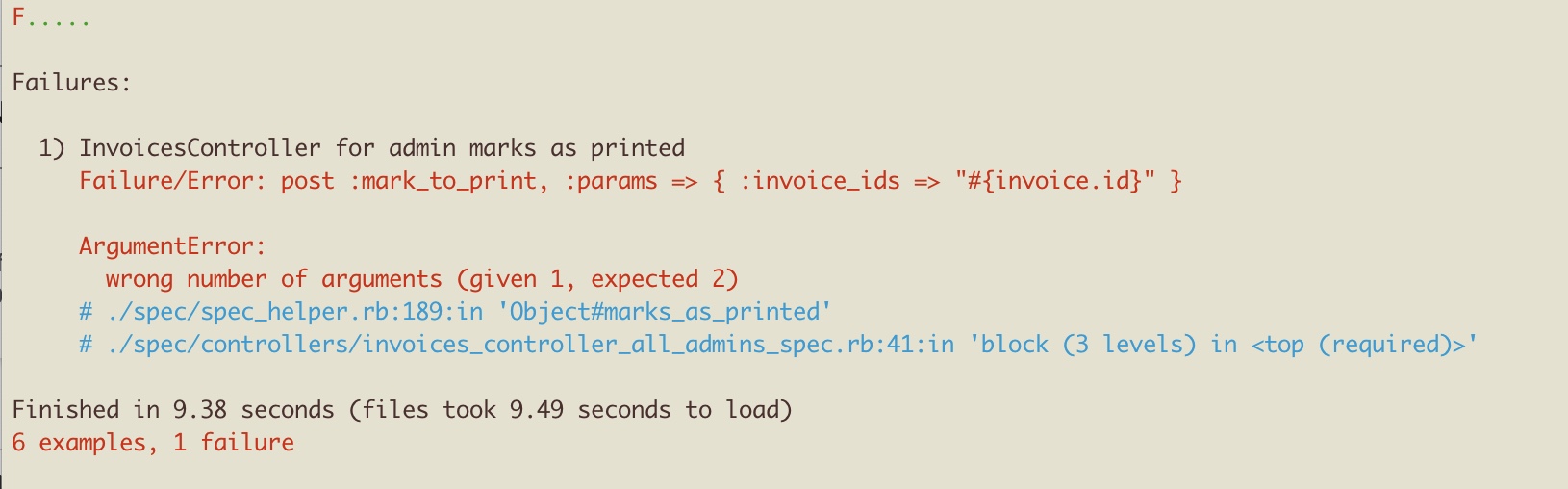
[FIXED]: Psych::AliasesNotEnabled: Alias parsing was not enabled. To enable it, pass aliases: true to Psych::load or Psych::safe_load
This happens on older versions of ruby and rails.
Solved by downgrading psych:
# Gemfilegem 'psych', '< 4'
This happens on older versions of ruby and rails.
Solved by downgrading psych:
# Gemfilegem 'psych', '< 4'
The solution is, make sure that the file /etc/fuse.conf has the following line:
user_allow_other
This article will outline how I deal with managing my own data, tasks, hardware, people, etc. This is the latest of many versions - continuous iteration across many revisions has been done!
As Wasya Co offers one-click deployments of several applications and stacks, it makes sense for us to track our competitors. Nothing is new under the sun, and turn-key web applications (appliances) have existed for quite some time. There are many, many solutions for deploying infrastructure as a service (IaaS, SaaS). Multiple industries support the general Installation & Provisioning specialization. Of note, Docker, which we use extensively in-house, provides "one-click" deployments at scale, and more.
while [ $# -gt 0 ]; do
case "$1" in
-p|--p_out=*)
p_out="${1#*=}"
;;
-a|--arg_1=*)
arg_1="${1#*=}"
;;
*)
printf "***************************\n"
printf "* Error: Invalid argument.*\n"
printf "***************************\n"
exit 1
esac
shift
done
Mergulhe no mundo dos números com nossa seleção de livros gratuitos de contabilidade em PDF.
A contabilidade é essencial para a gestão financeira de empresas e organizações, fornecendo a base para tomadas de decisões econômicas informadas.
Desde os fundamentos da contabilidade até as técnicas avançadas, nossa biblioteca digital foi projetada para apoiar estudantes, contadores e profissionais do setor em seu desenvolvimento e prática profissional.
This one is pretty easy. Between suffixes (namespaces), roots (what a thing actually is), and suffixes and all that, I like to use a suffix (a word-final thing, something that goes at the end of the word) that denotes the type of the thing (name, variable) being used. It probably sounds more complicated than it really is so here are some clarifying examples.
The following examples are either variable names, or properties of an object, or fields of a model, or methods in a class, or keys in a hash. Hopefully you get the idea.
When it says, something went wrong and teams could not be installed --
User TAFHBES published the answer on March 27, 2023:
"I had same problem on my iMac running Ventura on Intel. Problem went away when I placed installer in applications folder before running installer."
~ * ~ * ~ * ~
And this has worked for me. When I moved the installer to the Applications folder, it could finish the installation successfully.
~ * ~ * ~ * ~
You can do the following in your Gemfile, but then you'd have to switch the Gemfile between development and production, which is not recommended:
# Gemfile gem "foo", path: "/path/to/foo"
Alternatively, you can tell Bundler to use a local gem in your current environment. This is preferred as the Gemfile still points to the production version of the gem. Run this in shell:
bundle config set local.GEM_NAME /path/to/local/git/repository
If visual code opinionates about what you are typing, and you want it to stop, then perhaps you are looking for this setting:
"editor.acceptSuggestionOnCommitCharacter": falseDon't forget to backup your configuration file ~/.config/Code/User/setttings.json to be able to load it from backup later!
And while I have your attention, let's talk about configuring this text editor.
tl;dr: I decided not to do it.
Since Enzyme is obsolete as of React 18, you would use <render /> and not <mount />. Therefore, you don't have a wrapper to manipulate and observe the state of the component being tested.
Furthermore, I'm really only testing the component because it's a best practice, and because of the expectation of future complexity. The state change itself is trivial:
The solution for me was to clear Jest cache:
./node_modules/jest/bin/jest.js --clearCache
Seeing this ^ error and currently don't know how to fix it. It happens only on some of my (presumably identically configured) websites. This is happening when a user attempts to post any comment.
Turns out, this was due to a workflow rule that attempted to email the author of a parent-comment and notify them that their comment has been replied to. Since there is no parent comment, there is no email to send a message to, which was causing the error.
This is a non-obvious error I've observed in my docker containers running symfony on debian 11.
Found the solution on stack overflow. Re-installing the gpg key solved it:
wget https://packages.sury.org/php/apt.gpg apt-key add apt.gpg
Options trading is a complex field filled with various strategies and concepts that can influence the price movement of underlying assets. One such concept that traders often discuss is the "Options Max Pain." Understanding this concept can provide traders with insights into potential market behavior, especially as options expiration approaches. This article will explore what Options Max Pain is, how it's calculated, and its potential implications for traders.
The Brave browser strives to be an independent browser, neither controlled by Google, nor by Microsoft, nor by any other evil mega-corp like Amazon or Facebook. Unfortunately, it still keeps asking the user to update it, and does not give the option to reject the update without extra tweaking. (As reminder to corporations and developers: no means no. There is no "maybe later". It's a flat out no.)
With the recent politicizing agendas, it's worth mentioning that old versions aren't necessarily worse, and new versions aren't necessarily better. In case they disappear elsewhere, below you can find the instructions for installing Font Awesome v4.
You can download the package here: https://fontawesome.com/v4/assets/font-awesome-4.7.0.zip