Building an Agentic AI Email Client

In the process of building an agentic AI system, I will first build the "agentic" and "system" part, touching very little on AI. There are several reasons for this. Auditability is one of them. I want to know exactly what is happening and why. I think AI is mostly unnecessary for both (1) action-taking and (2) decision-making for me at this point. See Automation is more useful than artificial intelligence, for some free-style reasoning on the topic.
You can think of software system as an animal. Muscles, skeleton and the rest of the structure go a long way, long before intelligence in an animal becomes useful or desirable. I'd take an ox or a mule over a monkey, for labor, most of the time. So let's develop the structure first - the muscles and bones - before we develop the brain.
I already have a draft of a system that can be converted to the agentic kind. Actually, I have two. One is the email client. The other is a trading bot - see Building an Agentic Trading Platform.
I have an email client (an entire email platform actually) and it can be converted to agentic. This means that the email client will respond to emails automatically. How fun would that be! I'm surprized I haven't done this before. Actually, I have worked for years on this project, taking very long breaks. And other people and companies have been working on it too, I'm sure sophisticated agentic email clients already exist, open-sourced or proprietary. I will make my own, both as an exercise and because I need it. And I won't just hand of work off to someone else and simply pay an API fee. No, I'll do the work myself, and own the finished product.
In the email system, the pieces are (0) receiving and parsing emails, (0) keeping track of previous conversations and the entire conversation history with this lead and leadset, (0) generating a response email (perhaps via a rich template), (0) and following an ?intent to move the lead down a sales funnel.
~ * ~ * ~ * ~
Alright, let's get started. We'll go from simple to complex to save ourselves time and headache. Let's review the trading platform architecture since it's already pretty much done. Also, we will be doing this in ruby on rails mostly, as a matter of personal preference. If you are starting from scratch I probably have to recommend python, since so much AI code is python. And I definitely recommend against typescript, I suggest you use pure javascript because it is so much clearer and lighter.
Let's say the setup has been done already. We'll go back to re-doing the setup once we establish the common time step. For now, assume everything is already working.
In simple terms, the email agent does the following:
 Upon receiving an email,
   Evaluate if any action needs to be taken.
     Examples are: add/remove tags, auto-respond, or (importantly) take an office action.
     Evaluation is semantically equivalent to taking the action.
That also sounds pretty simple. Here, I say that deciding that an action should be taken is the same as taking this action. It sounds reasonable to me, and it flows in the spirit of ruby-on-rails: the method is the same as the outcome of calling the method. Where is the agentic part then?
~ * ~ * ~ * ~
Let's look at existing agentic systems to see how they are built. A lot of them are phone systems: lets say you call your bank but the phone tries to talk to you without involving a human customer service representative. How do those systems work? I will skip the natural language stuff: voice parsing, voice generation and LLM have been done very well by the industry giants, and I can neither re-invent that stuff nor really improve on it. I'll use the available LLM's and synthesis/analysis routines. I'll assume simple english text is the universal interface. This can be expanded into yaml or json - which is again a language-looking minimal semantic container, but much more structured than english. The yaml/json interface then converts to code, particularly for API integrations - but that interface can also be clean and understandable. I don't need AI to write the API connector code, let's just say it can be written by people.
Context
The old-timer agentic system has context for the user: it knows who the user is, what's in his account, and what the user has said or done previously, somehow. For me, this info is structured data of the Leadset. Each person (email address) belongs to their company (leadset), and the many converations are all retrievable referencing this person (email). Relevant info is also retrievable from all conversations of all coworkers (company, leadset). This has been implemented.
Intent
The old-timer agentic system operates on intent. The system reads the intent of the customer (eg: check balance, report card stolen, make a payment, or commit government-assisted suicide). For now let's have all possible intents hard-coded. Then the system takes one of the possible actions. It seems an available action correlates very closely to an intent. Perhaps each intent corresponds to one or several actions. How would we write that in pseudocode?
 ## won't quite work:
 Upon receiving an email,
   Decide the intent (confirmable/overrideable), then
     Take action relevant to the intent.
However, my email system isn't a customer service chatbot. The email client doesn't react to sender's intent - it has intent of its own. The system has to have its own goals. I call the idea the sales funnel, for now. Since all of this is being done in order to generate revenue, I'm wiring this into sales first and foremost.
Several Pragmatic Definitions of Email Bots
Let's create several definitions of email bots that make sense and are pragratic. Let's design one or several sales funnels, or actions that an agentic bot can take. Let's do it already, in plain english. Remember we can convert that to yml/json, then to ruby interface calls, then to actual code implementation. Here we go. Some agents I already have a need for:
- BirthdayBot
- SpamCocktailBot
- EmailFluffBot
- ColdcallBot
And pseudocode definitions for each separately.
BirthdayBot
 BirthdayBot
   When it's someone's birthday as determined by tags and the clock,
     Generate an original birthday letter and send it.
ColdcallBot
 ColdcallBot
   For each tagged lead (in the campaign)
     periodically (every day)
       If I bothered them 0 times (n_impressions),
         send the main pitch.
         mark that I've bothered them 1 time.
       If I bothered them 1 time,
         send the 2nd reminder
         mark that I've bothered them 2 times.
       If I bothered them 2 times,
         send the 3rd sales pitch
         mark that I've bothered them 2 times.
       If I bothered them 3 times,
         remove tag, add tag `closed`
   When receiving an email in a relevant conversation,
     delete previously scheduled reminders
     remove tag, add tag `closing-manual`
SpamCocktailBot
 SpamCocktailBot
   When receiving an email from a spam lead (new or existing),
     Delete all previous follow-ups to this lead.
     Create a semi-meaningful reply and send it.
     Schedule to follow up in 2 days.
EmailFluffBot
 EmailFluffBot
   Periodically for each lead tagged to be conversed with,
     Taking previous conversations into account,
     Send them a generated email based on the general intent of the bot.
~ * ~ * ~ * ~
How would I keep track of how many times I've reached out to a lead? It would be a specific name for the campaign per-lead. We time-stamp everything in the name and while that by itself doesn't guarantee name uniqueness, it comes pretty close to that, and is very semantic and usable. An example campaign name (slug) is `20260320-director` or '20260320 KY director coldcall' or something similar, where I reach out to all director-level decisionmakers in Kentucky, today (different from doing the same thing tomorrow). Seach lead would then have the config param:
 this_lead.memory ||= {}
 this_lead.memory['20260320 KY director coldcall'] ||= {}
 this_lead.memory['20260320 KY director coldcall']['n_impressions'] ||= 0
 this_lead.memory['20260320 KY director coldcall']['n_impressions'] += 1
The word `memory` above doesn't quite mean anything, but there is also `this_lead.config` which is separate, and the memory items should not be in the root. Memory is Context, but I use the word Context elsewhere already.
And sending the main, 2nd and 3rd pitches are EmailTemplates. This object has already been built, and it has a context for the lead, so it's a transactional email with rich templating and variable substitution such as the lead's name.
Intent can be very easily implemented with tagging (which already exists). Have tags eg `intent-they-salespitch-me` belongs to tag `intents`, assign this tag to the lead or conversation, and there you go, it's been done.
Possible intents in email:
- they salespitch me
- they bother me for no reason
- spam
- automated... periodic
- a close friend
- a real human being
- a potential customer
- a recruiter
So, I can assign intent to the lead and to the conversation by just tagging them.
One more thing. We need to conceptualize a sales funnel. See the article on Sales Funnel: Definition, Models and Stages.
~ * ~ * ~ * ~
It's a good idea to write down the slugs you're planning to use ahead of time, at the planning stage, and not change them later. There is little validation of slugs, so you must be exact in how you access objects. I like to begin every slug with the date in yyyymmdd format, or yyyymm format. This was worked well for me, especially because sorting alphabetically also sorts by-date.
You need every email template slug. The templates are:
- 20260320-coldcall-intro
- 20260320-coldcall-intro-1
- 20260320-coldcall-intro-2
You need every tag's slug. They are:
- 20260320-coldcall-active
- 20260320-coldcall-done
The slug for this campaign can be: `20260320-coldcall`. Notice that I avoid spaces in slugs. Slugs should be url-encoded.
EmailTemplate's
So my agentic ai email bot will send out a sequence of emails to cold leads. Let's write the content for the emails. This funnel is for technical decision-makers, executives such as CTO's at their companies. First, the bot will introduce itself and ask permission to continue. Then, the intent will be captured, which is one of: (1) `no-stop`, (2) `yes-continue` and (3) `no-response`. If they do respond positively, `yes-continue`, actually I should already switch the process to manual, since it would be an interested customer already. Actually getting a single person to respond `yes-continue` will result in successful completion of this task. If they reply `no-stop`, the bot sends a nice final `tmpl-fin-neg` message. If there is `no-response`, the `tmpl-intro-2` message is sent. After that, if there is `no-response`, the `tmpl-fin-neg` message is sent. That's the complete bot and the complete funnel. Let's review.
There are two ways to creating the email templates. You can write them yourself and save them. Or you can use GPT to write and save them. This article is about the email bot, rather than the conversational LLM agent, so I'll skip the second, more complicated option, and just write the template from scratch. Actually, I'll still use a GPT, but will copy-paste the text manually.
 20260320-coldcall-intro
   prompt: Write a cold-approach email directed at CTO's and other technical decision-makers of technology companies, asking them if they'd like to hear about the technology services (such as software development or feature implementation) that Wasya Co offers.
Subject: Exploring Technology Solutions for [Company Name]
Hi [First Name],
I hope this message finds you well. I’m reaching out from Wasya Co, where we help technology companies accelerate their projects through expert software development and tailored feature implementation.
I’d love to understand your current technology priorities and explore whether our services could support your team in achieving them more efficiently. Would you be open to a brief call to discuss this?
Looking forward to your thoughts,
[Your Name]
[Your Position]
Wasya Co
[Contact Information]
 20260320-coldcall-intro-1
   prompt: write a follow-up to the previous, if he doesn't reply in 2 days
Subject: Following up on technology support for [Company Name]
Hi [First Name],
I wanted to follow up on my previous email regarding how Wasya Co can assist [Company Name] with software development and feature implementation.
If you’re open to a quick conversation, I’d be happy to discuss how our solutions could help your team achieve its goals faster and more efficiently. Please let me know a time that works for you, or I’d be glad to send over some brief information for you to review at your convenience.
Looking forward to hearing from you,
[Your Name]
[Your Position]
Wasya Co
[Contact Information]
 20260320-coldcall-intro-2
   prompt: write a final, closing follow-up saying to reach out to me if anything changes
Subject: Last follow-up – Wasya Co technology support
Hi [First Name],
I wanted to reach out one final time regarding Wasya Co’s software development and feature implementation services. I completely understand if now isn’t the right time.
If your priorities change or you’d like to explore how we can support your team in the future, please don’t hesitate to reach out—I’d be happy to connect whenever it’s convenient for you.
Thank you for your time and consideration,
[Your Name]
[Your Position]
Wasya Co
[Contact Information]
Create the email templates. We'll skip the `tmpl-fin-neg` message, since silence will serve just as well for now.
I'll be combining ruby code with using the UI. The UI specifically accommodates eval'ing blocks of code, in certain places. While less-secure than point-and-click, it offers me two advantages. Firstly, I don't have to imagine all of the UI that I think I'll need in the future. Just free-form callbacks go a very long way, and for a technical (expert) user that will be enough. Down the line, the system will offer multiple runtimes (eg you'll be able to write either javascript or ruby code, at your preferencE) as well as UI to not write code at all. And secondly, it offers me tremendous flexibility. As long as correct variables are exposed (and they are), I can be very sophisticated in what I do with them.
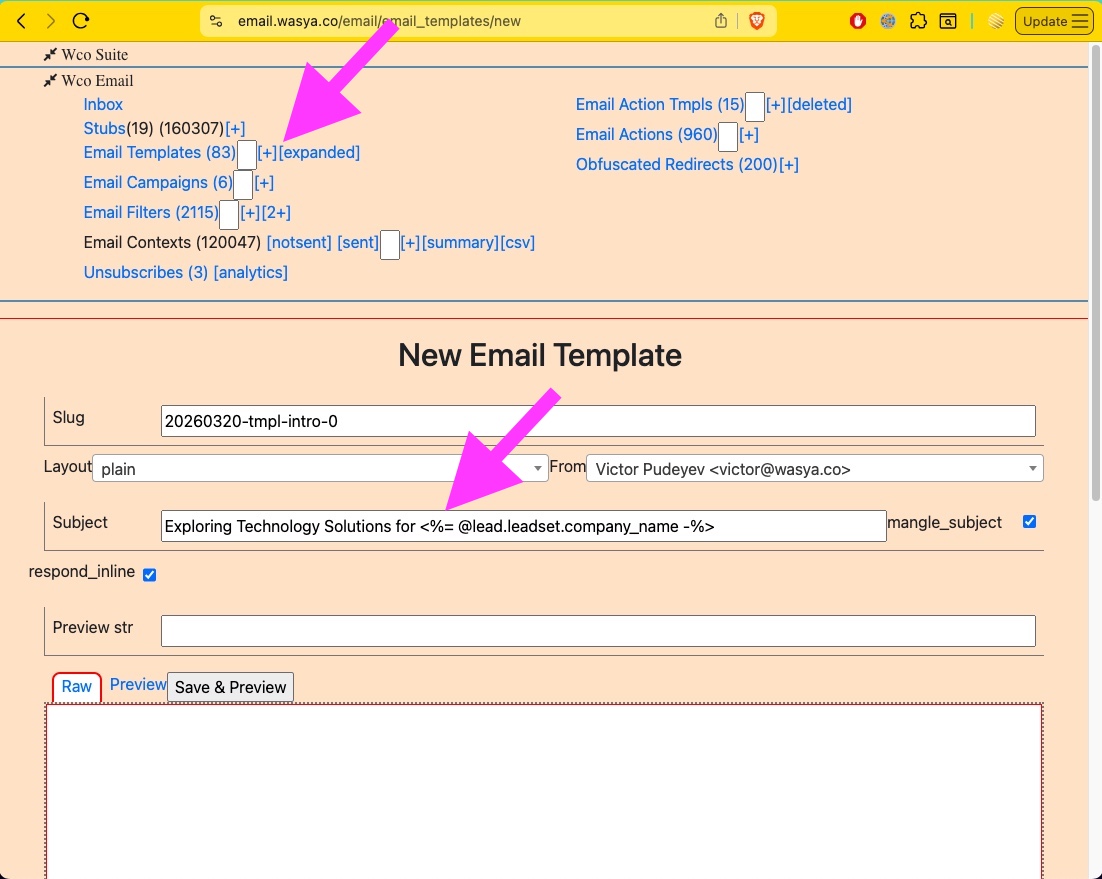
Click on the `[+]` link to start creating a new EmailTemplate.
Note that the subject, as well as the body, allows erb template variables. The available variables are listed.
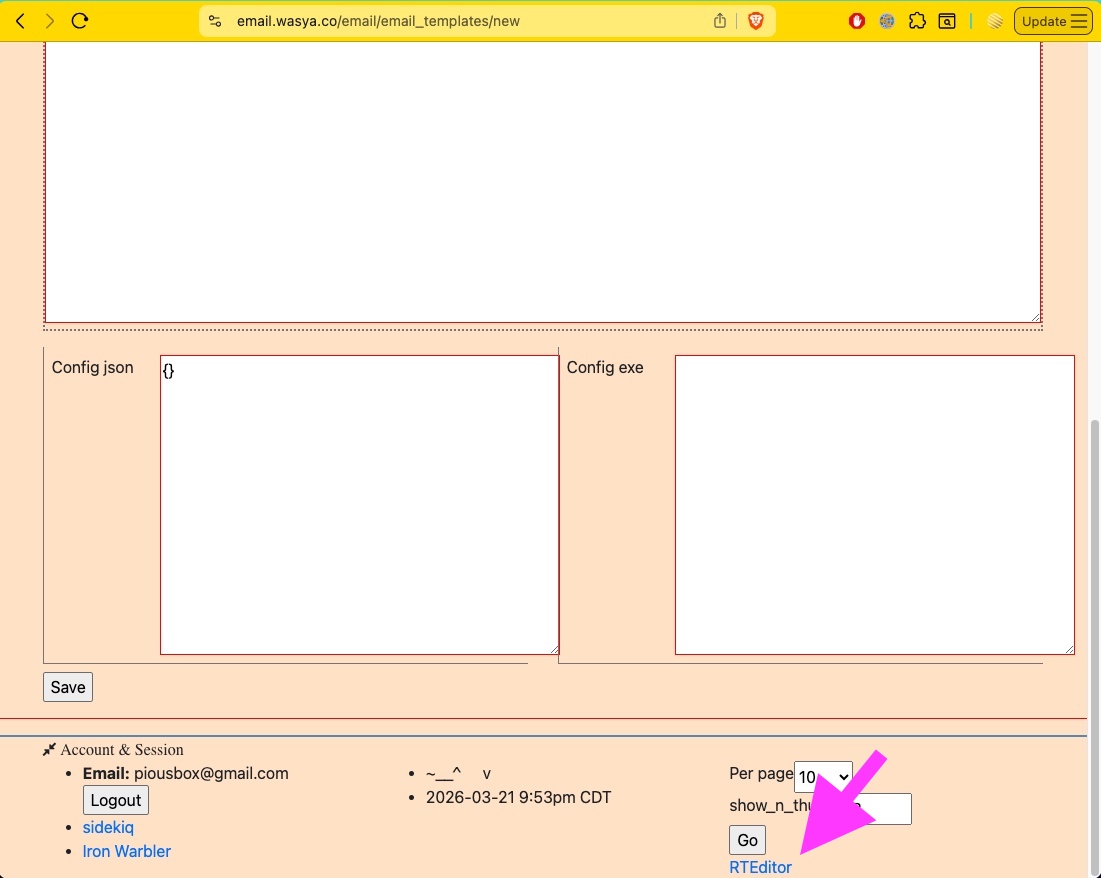
Click on the RTEditor link in the footer to open the rich text editor in a separate window.
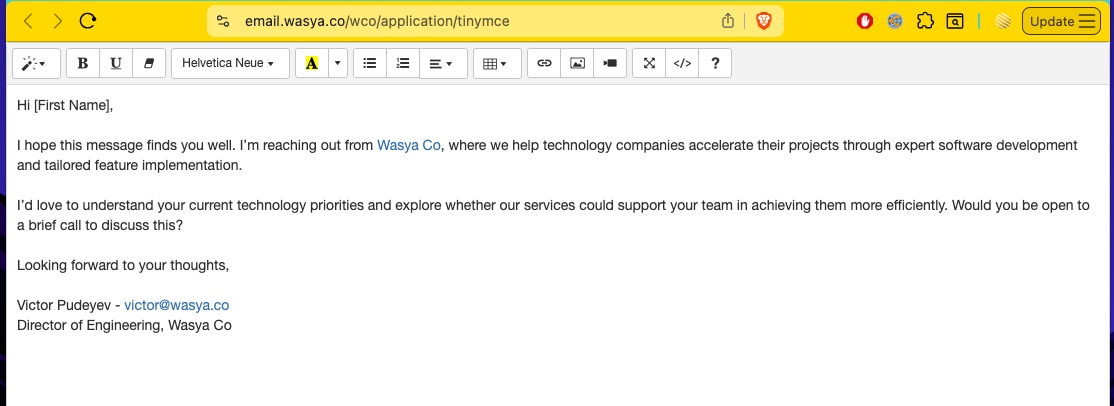
The reason the rich text editor isn't build into the form, is that as a technical user, you may want to put more than html tags in the body of the email. Specifically, you can use erb (ruby) templating to insert dynamic variables into the text. The available variables are listed in the tooltip info. For example, you can write:
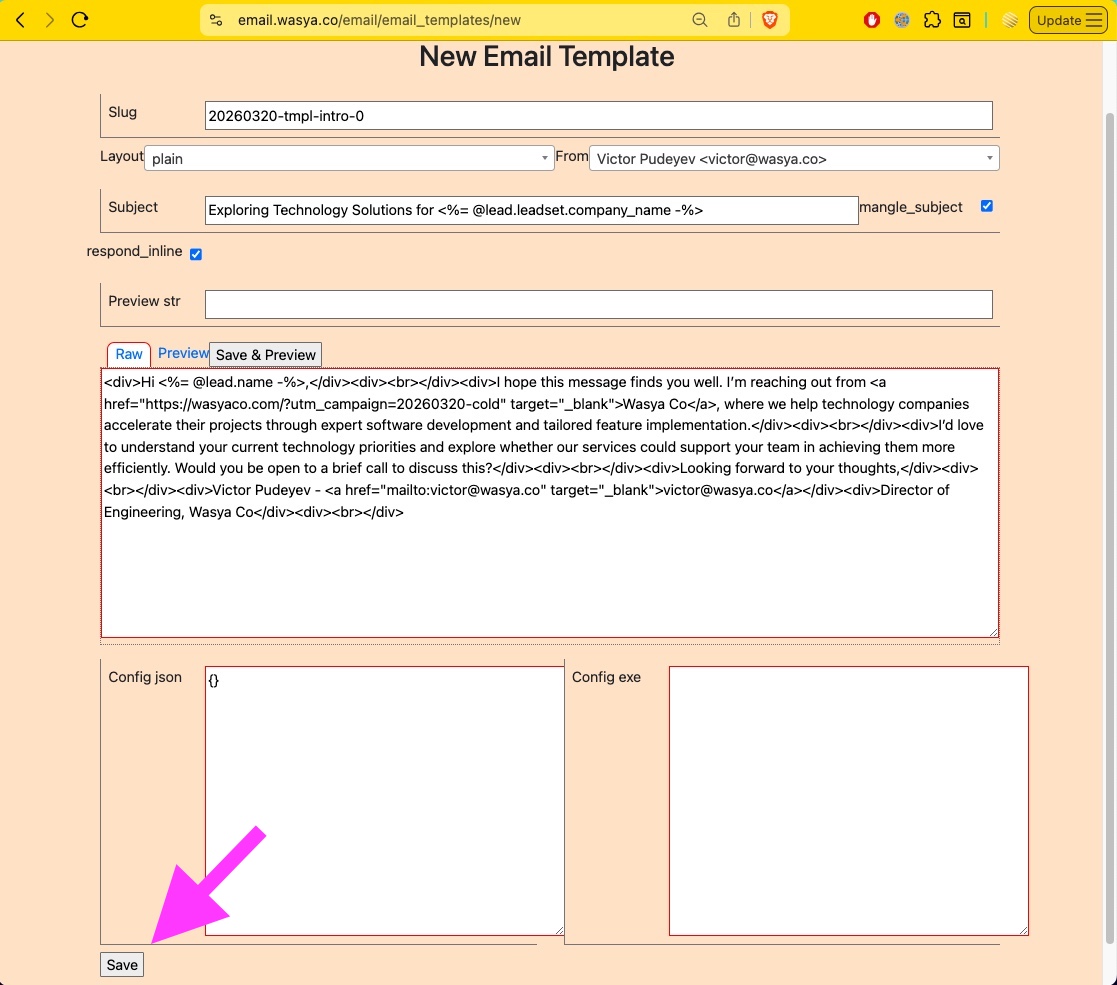
Hello <%= @lead.name -%>,To personalize the greeting. In order to allow this, currently, you must write plain text (that can include html code or other code). But you can still write rich text in the editor provided separately, then copy-paste the source into the form of the email template.
Finish pasting the values and click Save.
Machine States
The current_state machine states are:
- "begin"
- "no-stop"
- "no-response-1"
- "no-response-2"
- "yes-continue"
- "fin"
The state machines and state, although not mentioned by this term in this article before, refer to the a memorized state. The lead's state is persisted all around, and the lead has one state dictionary. If you saved something in this lead's memory a year ago, it will still be there. Therefore you may, or may not, want to separate the variables for this campain into its own hash:
## if you don't anticipate conflicts:
lead.memory['current_state'] = 'no-response-1'

## if you want to compartmentalize:
lead.memory['20260320-coldcall'] ||= {}
lead.memory['20260320-coldcall']['current_state'] = 'no-response-1'
which actually correlates to the `this_lead.memory['20260320 KY director coldcall']['n_impressions']` variable as so:
| n_impressions: | current_state: |
| 0 | (begin) |
| - | (no-stop) |
| 1 | (no-response-1) |
| 2 | (no-response-2) |
| - | (yes-continue) |
| 3 | (fin) |
I will use current_state, rather than n_impressions, as I believe it is more precise. Or I can use both. Now, let's implement this bot on the wco_email platform. Once implemented, we'll load some 100 leads as a trial data, and launch the campaign!
\<>
OfficeActionTemplate's (OAT)
Now, let's setup the bot, which consists of two parts. One is an OfficeActionTemplate, which sends the EmailTemplate's specified above. The other is an EmailFilter, which acts upon a responde from the lead.
Let's create the OAT, which is the potatoes and meat of this bot/campaign. In Pseudocode it might look something like this:
 OfficeActionTemplate
   if leads.count == 0
     report to self: the campaign has ended
     this_oat.unschedule()
   For each lead in the tag `a20260320-active-leads`,
     case lead.memory['current_state']
     when
       (begin)
         send: a20260320-tmpl-intro
         lead.memory['current_state'] = no-response-1
       (no-stop)
       (no-response-1)
         send: a20260320-tmpl-intro-1
         lead.memory['current_state'] = no-response-2
       (no-response-2)
         send: a20260320-tmpl-intro-2
         lead.memory['current_state'] = no-stop
         lead.tags.delete a20260320-active-leads
         lead.tags.add    a20260320-done-leads
       (yes-continue)
       (fin)
   next_at( Time.now + 2.days )
And the code:
tag = Wco::Tag.find_by({ slug: '20260320-coldcall-active' })
leads = tag.leads
if leads.count == 0
  @oat.update({ status: 'inactive' }) ## oat == office action template
  ApplicationMailer.notify_self({ subject: "Campaign 20260320-coldcall-active has finished." })
else
  leads.each do |lead|
    lead.memory['current_state'] ||= 'begin'
    lead.memory['n_impressions'] ||= 0

    case lead.memory['current_state']
    when 'begin':
      WcoEmail::EmailAction.create({
        lead: lead,
        template: EAT.find_by({ slug: '20260320-tmpl-begin' }), ## EAT == EmailActionTemplate
        perform_at: Time.now })
      lead.memory['current_state'] = 'no-response-1'

    when 'no-stop':
      lead.remove_tag tag

    when 'yes-continue':
      lead.remove_tag tag
      ApplicationMailer.notify_self({
        subject: "Campaign 20260320-coldcall-active lead #{lead.id} replied yes-continue!",
        body: "Lead: #{lead.inspect} <br /><br />" })

    when 'fin':
      lead.remove_tag tag

    when 'no-response-1':
      WcoEmail::EmailAction.create({
        lead: lead,
        template: EAT.find_by({ slug: '20260320-tmpl-cont-1' }), ## EAT == EmailActionTemplate
        perform_at: Time.now })
      lead.memory['current_state'] = 'no-response-2'

    when 'no-response-2':
      WcoEmail::EmailAction.create({
        lead: lead,
        template: EAT.find_by({ slug: '20260320-tmpl-cont-2' }),
        perform_at: Time.now })
      lead.memory['current_state'] = 'fin'

    else:
      ApplicationMailer.notify_self({
        subject: "Campaign 20260320-coldcall-active something went wrong with lead #{lead.id}.",
        body: "Lead: #{lead.inspect} <br /><br />Oat: #{@oat.inspect}" })

    end
  end
end
Let's paste it into the UI. It is a little complicated and technical, however, making a UI without the code will be even more complicated, and will only be done in the future if sufficient customer demand is demonstrated.
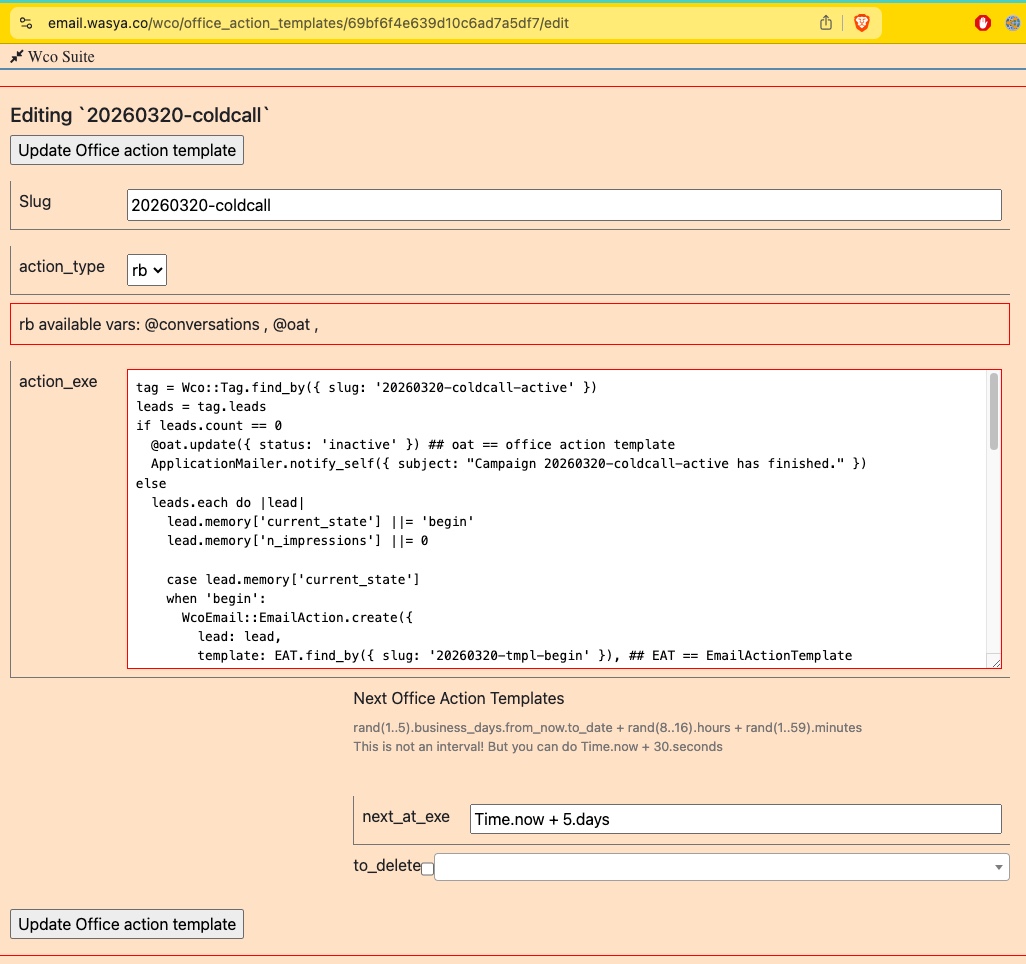
Let's move on to creating an email filter.
EmailFilter
The EmailFilter is another part of this bot. It takes care of the replies (if any) from the leads.
 EmailFilter
   if lead.tags.include? a20260320-active-leads
     intent = induce_intent()
     lead.memory['current_state'] = intent
     case intent:
     when 'yes-continue':
       notify self: Email.find('this-lead-is-interested', lead:, )
     when 'no-stop':
       lead.tags.delete a20260320-active-leads
       lead.tags.add    a20260320-done-leads
     default:
       notify_self: Email.find('for-review', lead:, )
And this is pretty much it. The only thing left to do is to put 100 leads in this trial tag... and launch it!
Here is how to import emails into a tag:
\<>
And to launching the campaign, simplly create the OfficeAction off of the template.
Great! Now that it's launched, lets monitor the process. I've added myself as one of these leads, so I'm going to test the workflow by participating on both sides of the campaign. I will reply both yes-continue and no-stop, to test the workflow.
\<>
The above workflow is an example of how to setup an Email Agent in the wco_email system. We didn't really use AI for this, only the intent induction part.